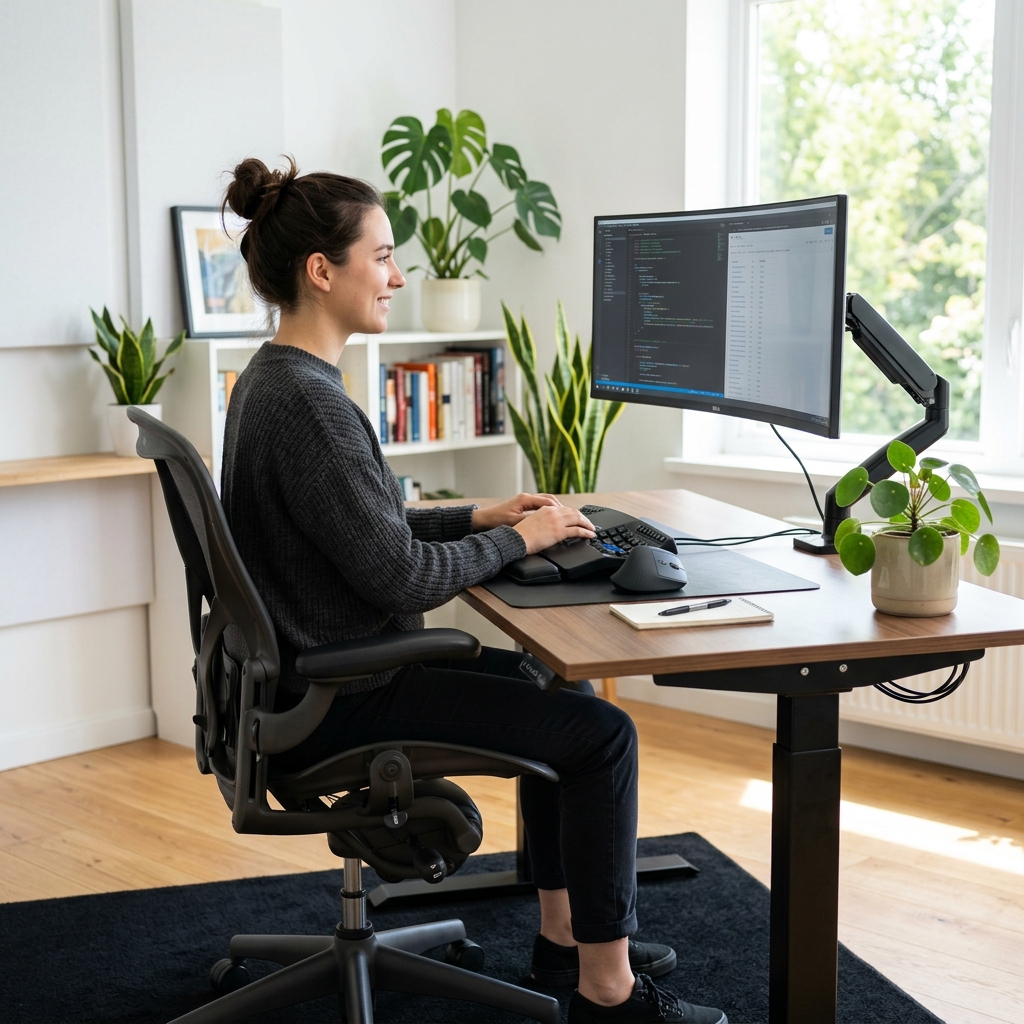
If you spend hours every day at a keyboard, your hands are your most valuable tools. Ergonomic typing isn't just a buzzword; it's a collection of habits and setup choices that prevent long-term injury like Carpal Tunnel Syndrome or RSI (Repetitive Strain Injury). By optimizing your workspace today, you ensure that you can continue typing at peak performance for decades to come. Neglecting ergonomics is like a professional athlete neglecting their warm-up; it might not hurt today, but the cumulative damage can be career-ending.
The Golden Rule of Posture: The 90-Degree System
Your body should form a series of 90-degree angles. Your elbows should be at 90 degrees, your hips at 90 degrees, and your knees at 90 degrees. This distributes weight evenly and reduces strain on your lower back and neck. Keep your feet flat on the floor or on a footrest to maintain this alignment. If your feet are dangling, you are putting unnecessary pressure on your lower back, which can lead to chronic pain over time.
The Floating Wrist Technique (The "Piano" Method)
Avoid resting your wrists on the desk or a hard wrist rest while typing. Instead, let them float slightly above the keyboard, much like a professional pianist. This allows your larger arm muscles to handle the movement rather than straining the delicate tendons in your wrists. If you must use a wrist rest, use it only during pauses, not while actively typing. Resting your wrists while typing creates a "pivot point" that forces your hands into awkward side-to-side movements (ulnar deviation).
Monitor Height and Distance: The "Eye Level" Rule
The top of your screen should be at eye level or slightly below. If it's too low, you'll hunch forward (the "tech neck"), causing pain in your shoulders and upper back. The screen should be about an arm's length away to reduce eye strain and keep your neck in a neutral position. If you use multiple monitors, ensure they are at the same height and angled slightly towards you to minimize neck rotation.
The Keyboard Angle: Avoid the "Kickstands"
Many people use the little feet at the back of their keyboard to tilt it up. From an ergonomic perspective, this is actually worse for your wrists as it forces them into an upward bend (extension). A flat keyboard, or even one with a slight "negative tilt" (tilted away from you), is much healthier for your tendons. Negative tilt allows your wrists to stay in a "neutral" position, which is the most relaxed state for your carpal tunnel.
The Rise of Split and Columnar Keyboards
For those serious about ergonomics, a standard "row-staggered" keyboard is fundamentally flawed. It forces your wrists to bend inwards (radial deviation). Split keyboards allow you to place each half at shoulder width, keeping your arms straight and relaxed. Columnar (or ortholinear) layouts align keys in straight vertical columns, matching the natural movement of your fingers and reducing horizontal travel.
Chair Support and Desk Height: The Foundation
Your chair should provide strong lumbar support for your lower back. Your desk should be at a height where your shoulders remain relaxed and your forearms are parallel to the floor. If your desk is too high, you'll find yourself shrugging your shoulders, which leads to tension headaches and neck pain. Consider a standing desk to vary your posture throughout the day, but remember that standing with poor posture is just as bad as sitting with it.
Lighting and Visual Ergonomics
Eye strain is a major part of ergonomic health. Ensure your room is well-lit but avoid glare on the screen. Use a "bias light" (a strip of light behind your monitor) to reduce the contrast between the screen and the wall. This makes the screen feel "easier" on the eyes, especially in the evening. Follow the 20-20-20 rule: every 20 minutes, look at something 20 feet away for 20 seconds to reset your eye focus.
Case Study: Recovering from RSI
Meet Sarah, a software engineer who developed severe wrist pain after years of 10-hour days. By switching to a split mechanical keyboard, adopting the floating wrist technique, and taking scheduled breaks, she was able to return to full productivity without surgery. Her story is a reminder that it's never too late to fix your ergonomics, but it's much easier to prevent the pain than to cure it.
Stretching is Non-Negotiable: The "Desk Yoga" Routine
Every 30 minutes, take a 2-minute break. Shake out your hands, stretch your forearms by gently pulling your fingers back towards your wrist, and do some shoulder rolls. These small breaks are the secret to typing for a lifetime without pain. They also provide a mental reset that can actually improve your problem-solving speed when you return to the keys.
Conclusion: Your Hands are Your Career
Whether you are a writer, a coder, or a student, your keyboard is your primary connection to the digital world. Treating it with respect—and treating your body with respect—is the best investment you can make in your professional future. Start small: put those keyboard feet down today and feel the difference.